Showing posts with label WINDOWS PC. Show all posts

How To Increase Internet Speed : 5 ways to speed up your internet connection

Hello guys,today I'm back with some cool tweaks to speed up the internet connection. Everyone hates slow internet. Everyone wishes to have high speed internet connection but can't afford for that.So, many of the users are forced to run slow internet connection.But now the slow internet problem is solved. I have done some research and came here with some tweaks to boost up slow internet connection . Yes,you have heard right working tricks to boost up slow internet connections . I've used this 4 ways to increase the speed of my internet.So,lets see 4 ways to speed up slow internet connection.
How to Speed up slow internet connection?

1]  Optimize your Browser 

This is a biggining tip to optimize internet.If you're using some old version of browsers or internet explorer then go and update that browser to latest version of that browser. I would suggest to use Google Chrome. Google chrome uses less memory and bandwidth than other browsers. Yeah,you can also try for Firefox or opera browser but they uses more bandwidth then Google Chrome

2] Speed up Internet with Top Public DNS Servers

DNS server is also playing an important role in the increasing the speed of your internet connection.Using this trick you can boost up your internet speed on windows easily. Now let's start how to boost the internet connection's speed by using public DNS server addresses.
List of top 10 high speed internet DNS server addresses
Google:
Preferred DNS server - 8.8.8.8
Alternate DNS server - 8.8.4.4
Comodo DNS:
Preferred DNS server - 8.26.56.26
Alternate DNS server - 8.20.247.20
Norton DNS:
Preferred DNS server - 198.153.192.1
Alternate DNS server - 198.153.194.1
OpenDNS:
Preferred DNS server - 208.67.222.222
Alternate DNS server - 208.67.220.220
Level3:
Preferred DNS server - 209.244.0.3
Alternate DNS server - 209.244.0.4
ScrubIT3:
Preferred DNS server - 67.138.54.120
Alternate DNS server - 207.225.209.77
OpenNIC4:
Preferred DNS server - 69.164.208.50
Alternate DNS server - 216.87.84.211
Public-Root5:
Preferred DNS server - 199.5.157.131
Alternate DNS server - 208.71.35.137
DNS Advantage:
Preferred DNS server - 156.154.70.1
Alternate DNS server - 156.154.71.1
SmartViper:
Preferred DNS server - 208.76.50.50
Alternate DNS server - 208.76.51.51

Steps to insert Public DNS server in windows


Go to Control Panel
Open Network and Sharing Center
Then Open Local Area Connection and select IPV4 and properties


Now Click on Use the following DNS Server addresses and change it with any of above given top public DNS Address and click on OK.
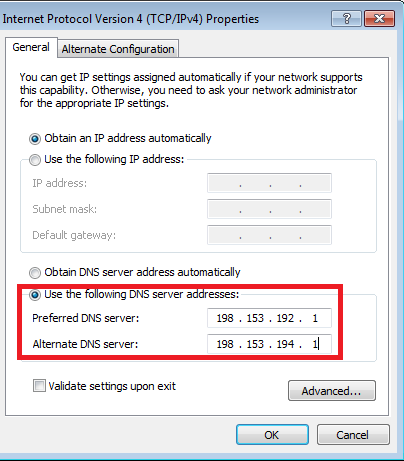

You've now boost up your internet connection using Public high speed DNS Server.

3]  Using Command Prompt (  CMD ) to speed up slow internet connection

Yes,you can also boost up internet speed connection using cmd trick. This trick is simple and I would like to say this trick won't increase speed internet connection dramatically but definitely it will boost the existing connection to better performance. So,lets see how to do this.

Steps to perform to boost internet connection using command prompt

Click on Start and Select all programs
Click on accessories and select command prompt 
Now,run cmd as administrator 
Type following lines in command prompt and hit enter


netsh int tcp show global
netsh int tcp set global chimney=enabled
netsh int tcp set global autotuninglevel=normal
netsh int tcp set global congestionprovider=ctcp 


That's all setting to boost up internet connection using command prompt.


4]  Speed Internet Connection Using Microsoft by 20%


Most of the Windows computer users don't know that the Microsoft has reserved 20% of our internet bandwidth for some of their own purposes like Windows update. By doing some changes on Local group policy of Windows computers, we can use the internet connection's maximum bandwidth.

Steps to perform to boost internet connection using microsoft by 20%

Click on Start Menu and type run and hit enter. ( Use Windows key + R )

Type gpedit.msc on run command and hit enter.

Now go to Local Group Policy --> Computer Configuration --> Administrative Templates --> Network. 

Now double click on QoS Packet Scheduler

Then double click on Limit reservable bandwidth


Now a window will appear. In that window, select Enabled and then make bandwidth limit to 0 (zero). Finally click on OK.


That's all about how to increase speed up a slow internet connection . Hope you enjoyed a lot and if you've got any new tricks then feel free to share here.Thanks for reading this article and don't forget to share your response on 4 ways to speed up slow internet connection. Have a Good day and enjoy new internet speed

5] It is very important step
 To increase your downloading speed you have to use Internet Download ManagerManager.
In my openion it is the best downloader which uses full internet speed to download any file.


Honestly friends these all tricks are unlock your bandwidth which is lock by default in windows. These will not increase your internet but increase your system Internet Performance.
For increasing internet you have to buy a good 3g or 4g connection.

Internet Download Manager 6.22{Latest} full version is here for free


Internet Download Manager (IDM) is a tool to increase download speeds by up to 5 times, resume and schedule downloads. Comprehensive error recovery and resume capability will restart broken or interrupted downloads due to lost connections, network problems, computer shutdowns, or unexpected power outages. Simple graphic user interface makes IDM user friendly and easy to use.Internet Download Manager has a smart download logic accelerator that features intelligent dynamic file segmentation and safe multipart downloading technology to accelerate your downloads. Unlike other download managers and accelerators Internet Download Manager segments downloaded files dynamically during download process and reuses available connections without additional connect and login stages to achieve best acceleration performance.

Features

  • New support for latest chrome, Firefox and skymonkey update versions.
  • Better performance in video downloading sites. Like YouTube, Metacafe a and other flv sites.
  • The IDM Site Grabber is better than ever.


DOWNLOAD

If you can't download [click here]

Eboostr pro full version for free [Latest] Increase pc ram


Eboostr solution to slow pc

Eboostr is an amazing software which can convert your pendrive into RAM. And increase your system speed. This amazing software can increase your computer speed without any hardware changes.

Features

  • It can convert your Pendrive into RAM..
  • eBoostr is designed to make your computer faster. It features an easy to use interface and an auto-configuration wizard which will help you get “up to speed” in no time at all.
  • Just because your computer is slowing down doesn’t mean it’s time to abandon it. Breathe new life (and speed) into your old computer with eBoostr.
  • eBoostr allows you to cache on any major Windows system, running any motherboard and any drive configuration, to any choice of  cache medium you want from RAM to SD cards to SSDs with zero CPU overhead.


How to install ?


  1. Install eboostr and reboot your pc.
  2. Now open task manager and go to process tab and kill all eboostr processes.
  3. Now copy the cracks  into installation directory. ex. C/Programe files/Eboostr
  4. ENJOY


If you can't download [click here]

NCH Videopad Video Editor Professional Full Version is here


Why to choose videoad ?


  • It has small size but have big featues

Stunning Video Transitions and Effects

  • Choose from a wide range of video clip transitions
  • 3D video editing and 2D to 3D stereoscopic conversion
  • Customize the duration of applied transitions
  • Overlay text for captions and movie credits
  • Chroma key green screen video production
Amazing Audio Tools
  • Import and blend music tracks like a professional.
  • Create your own tradition movie soundtrack.
  • Record your own descriptions with just a click of a button.
  • Import pre-recorded narrations, sound effects or music.
Complete Video Optimization
  • Fine tune brightness, saturation and color for your video.
  • Add digital images and photos with a click of a button.
  • Put on effects like black & white, sepia tone and negative.
  • Add text subtitles to your movie.
Share with Your Family and Friends
  • Burn to DVD and see in your living room on your TV.
  • Save for Youtube and share online to your friends.
  • Save to PSP, iPhone, iPod or 3GP mobile phone.
  • Save to your PC as a high-quality digital movie.
Input Formats
  • Video: mpeg, avi, wmv, Xvid, divX, mpeg2, mpeg1, mpeg4, mov, mp4, vob, asf, .3gp, ogm, RM, H.264 and much more.
  • Image: gif, bmp, jpg, jiff, jif, exif, jpeg, png, tif.
Output Formats
  • Disc export: CD, DVD, HD-DVD, Blu-ray Discs
  • Video export: wmv, avi, asf, 3gp, mpg, mov, mp4, iPhone, iPod, Mobile Phone, PSP, Pocket PC
Pros:
  • Very simple to utilize
  • Works with many multimedia formats
  • Contains a few video effects
Cons:
  • Too easy for more progressive users
  • Only three transition effects
Install Notes:
  • Extract files.
  • Run the setup
  • Use the given patch by copy it to the install directory to activate.
  • Enjoy!

DOWNLOAD

If you can"t download (click here)

DriverToolkit License Key, Crack Is Here


Why Choose DriverToolkit?


  • Driver problems of Quick Fix:
Hardware devices don’t work erratically. Such situations can often be caused by missing / outdated drivers. DriverToolkit Crack, checks for updates to the driver, makes your drivers are always updated, keeps your system running at ultimate performance.
  • Excellent research pilot:
Let DriverToolkit do the hard work for you with no more frustrating searches for pilots. Our database updated daily driver contains numerous units of the pilot, which empower DriverToolkit 8.4 to offer the nove official drivers for hardware devices of all PC vendors.
  • Simple & accessible:
DriverToolkit License Key is designed having a user friendly interface. Driver problems can be fixed with few a clicks. No prior knowledge required for DriverToolkit 8.4 Crack.
  • Cent% safe & safe:
All drivers are from official manufacturers & double checked by our professional IT. DriverToolkit 8.4 back-up your current drivers before any new default driver installation & one can restore old drivers whenever you want with just one click.
Main features:
  • Download & fix driver problems:
DriverToolkit 8.4 Pro automatically delivers the latest official drivers for your PC. DriverToolkit resolve driver issues painful for you offering official versions / WHQL versions.
  • Install the driver update:
You can easily update all drivers with DriverToolkit 8.4.
  • Back up your important drivers:
While using DriverToolkit 8.4 License Key, you can easily make a copy of all the drivers currently installed on your system in one click.
  • Restore your backups drivers:
Just save all the drivers & you can restore all your drivers when you want. This feature can be very useful when you need to install drivers on multiple PC with the same hardware configuration.
  • Remove unwanted drivers:
DriverToolkit 8.4 key, has the ability to find hidden drivers that are no longer in use and help you get rid of them quickly.
Operating systems:
  • Windows XP
  • Windows Vista
  • Windows 7
  • Windows 8
  • Windows 8.1


DOWNLOAD


If you can"t download click here